Most people try to manage their personal finances with Excel, banking apps and a scattered set of tools. I used to do the same, until I got tired of depending on manual processes, isolated data and methodologies that don’t scale. This article explains how I built my own automated financial management system using Notion to centralize and visualize data, Python to process it and Google Gemini to automatically classify thousands of bank transactions.
If you’re interested in automating your finances, saving time and making decisions with real data, this is for you.
Why I left Excel and moved to Notion to manage my finances
For years I used Excel to track my expenses and income. It didn’t work badly, but it had an obvious problem: it depended entirely on my manual discipline. Months would go by, I wouldn’t update anything, and when I finally sat down to catch up I had months piled up, hundreds of uncategorized transactions and inconsistent data.
It was frustrating because the system depended on my time, my attention and my consistency. And when you have work, studies and a personal life, it’s easy to push that to the back burner. What I ended up understanding is that Excel wasn’t the problem; the problem was friction. Every time I didn’t log an expense, I was generating “administrative debt”. And every month that passed, that debt grew.
I needed a system that was more centralized, more flexible and, above all, automatable.
Why Notion is a good tool for personal finances
At that point I rediscovered Notion, a tool I already used for other areas of my life. The key to Notion isn’t that it looks nice, but that it lets you structure information your way, create relationships between data, visualize metrics and design custom dashboards.
Migrating my personal finances to Notion meant going from scattered, static data to having a centralized system that connects my finances with my goals, my projects and my habits. Notion let me build a financial dashboard tailored to my needs, with my own categories and metrics, without depending on whatever a banking app decided to show me.
On top of that, I was able to integrate every area of my life in one place: projects, documentation, tasks, knowledge and finances, avoiding the chaos of working with twenty different tools.
Notion isn’t a financial app, but if you put in the work, it can become a very powerful financial management platform.
Risks and trade-offs: privacy vs control
Moving my finances to Notion wasn’t free of risks. Notion doesn’t encrypt data end to end; it encrypts it in transit, but not at rest. Technically, they could access your information.
In their favor, they hold ISO 27001 certification and run periodic audits, which provides some backing and confidence in terms of security and best practices. But it’s still a trade-off.
The real question isn’t whether Notion is completely secure (no platform is) but whether you’re able to keep manual track of your finances or not. In my particular case, it was a reasoned leap of faith. And I don’t regret it.
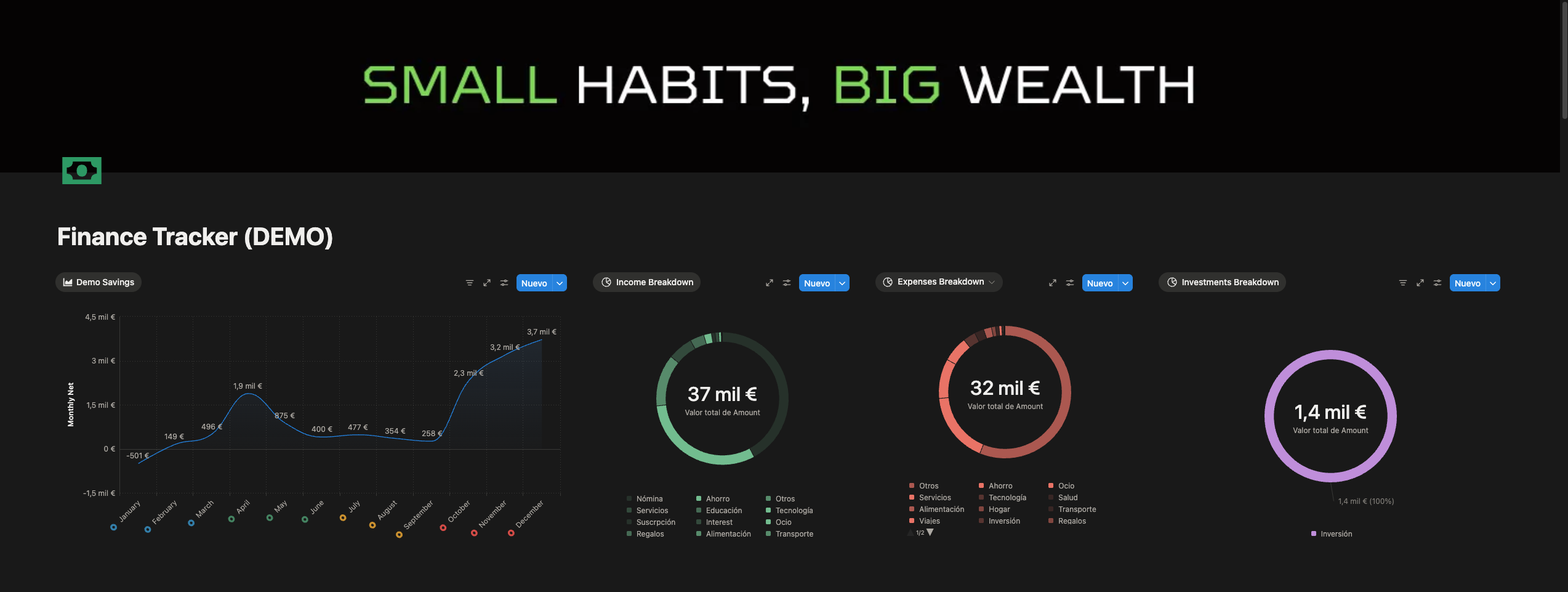
Note: the data has been altered for privacy, and what’s shown is an example of what you can achieve in Notion after uploading the data.
The big problem: Notion AI is useless for categorizing finances
A curious detail was that Notion AI promised to do exactly what I needed: read bank descriptions and classify them automatically. In theory, it was ideal. In practice, it was a disaster.
It failed frequently, mixed categories nonsensically, made up information, had no memory and, when the free trial ended, it didn’t renew. This was stated in their policies, but let’s be honest: almost nobody reads them.
The result was simple: thousands of pending transactions and zero real possibility of maintaining them manually. At this point, the options were clear: go back to Excel or build my own system. I chose the latter.
My solution: automate everything with Python, the Notion API and Google Gemini
The solution was to build a simple, scalable and cheap workflow. The process is as follows: I download the bank statements in XLS format, automatically convert them to CSV, and a Python script reads them, cleans them and sends them to the Notion API. Before uploading them, each transaction goes through the Google Gemini API, using the gemini-flash-2.5-lite model, which is extremely cheap and precise enough for simple classification tasks.
Why use AI for this? Because categorizing transactions manually is slow, tedious, error-prone and completely unnecessary when you have hundreds or thousands of records. I had almost a year pending. Just thinking about it gave me a headache.
Why this model in particular? Because I didn’t need a complex and expensive model. I needed an efficient, fast and cheap classifier. Gemini fit that description perfectly.
The prompt I used was something as direct as this:
Classify this bank description into ONE category (Spanish).
Possible: Alimentación, Transporte, Hogar, Ocio, Salud, Tecnología, Servicios, Ropa, Inversión, Ahorro, Regalos, Viajes, Suscripción, Otros, Nómina, Ingresos Extra.

RULES:
1. 'Banco XYZ' -> 'Ahorro'.
2. Gym, sport -> 'Salud'.
3. 'Inversiones XYZ' -> 'Inversión'.
4. Supermarkets -> 'Alimentación'.
5. Restaurants/Bars -> 'Ocio'.
6. If it looks like a salary or recurring income -> 'Nómina'.

Description: '{concept}'. Answer with the word ONLY.
Gemini returned the category, Python parsed it and Notion stored it in the database. This flow processed thousands of transactions in a matter of minutes, with an accuracy that, in my experience, beats several commercial financial management apps.
Result: modern, automated and useful financial dashboards
With the data classified and centralized in Notion, I was able to build financial dashboards that answer real questions: how much I spend by category and by month, what trends appear over time, how my burn rate behaves, how much money I put toward investment, how many subscriptions I don’t use and how my financial habits have changed.
This stops being simply “looking at numbers” and becomes making data-driven decisions.
Conclusions: automating your finances is easier than it seems
Migrating my finances to Notion wasn’t an aesthetic whim. It was a necessity. Notion gave me structure, control and customization. Python and Gemini brought massive automation at a minimal cost. The result is a system that lets me review my finances in seconds, not hours.
And, most importantly, I work with data I understand, because I defined the rules, the categories and the logic of the whole system.
Next steps: toward a fully autonomous financial system
The system works, but it can still improve. Right now I’m working on:
- Automatic detection of duplicate transactions.
- Identifying internal transfers between accounts so they’re not recorded as expense or income, but as neutral movements.
- Integrating investment data.
- Periodic monthly automation of the process.
When the system is robust enough, it might make sense to release part of the code or document the setup in a more technical way so others can replicate it.
If you’re interested in building something similar, learning to work with Python and the Notion API, or you want to know how to use cheap AI to automate repetitive tasks, you can get in touch with me. And if you’re interested in seeing the code behind all this… that’s negotiable.
See you on the net.